Quickstart
Everything you need to know to get started with PyLoan - a mortgage/loan calculation tool.
Define a loan
Defining a loan with PyLoan is very simple. Begin by importing the PyLoan module:
from pyloan import Loan
Next define a loan:
loan = Loan(loan_amount=160000,interest_rate=1.1,loan_term=10,start_date='2020-06-15')
The above defines a 10-year mortgage/loan of 160,000 EUR with annual interest of 1.1% starting on the 15th of June 2020. By default, monthly payment amount will be calculated to amortize the loan amount fully over the given loan term. Also, by default, monthly payments fall on the last day of the month.
Loan arguments
The loan has the following required arguments:
loan_amount: the amount of money being borrowed. Input must be greater than zero.interest_rate: the annual interest paid on the loan/mortgage. Input must be greater than zero.loan_term: the number of years/months of the loan/mortgage. Input must be an integer greater or equal than 1.start_date: the date as of which the loan/mortgage begins. Input format must be YYYY-MM-DD.
In addition, the loan has the following optional argument:
loan_term_period: the period of the loan term, ‘Y’ for years or ‘M’ for months. Default value is ‘Y’.payment_amount: the amount used to repay loan/interest. Default value is None. When the value is set to other than None, the specified amount will be used to cover interest and principal repayments.first_payment_date: the date as at which first payment on the loan/mortget is made. Input format must be YYYY-MM-DD and greater than the start date. Default value is None.payment_end_of_month: boolean argument that defines whether loan/mortgage repayments fall on month-end or not. Default value is True. If set to False, andfirst_payment_dateis None then loan/mortgage payments will fall on the day specified in thestart_date.annual_payments: the number of annual payments on the loan/mortgage. The argument can be set to either 12 (monthly), 4 (quarterly), 2 (semi-annual), and 1 (annual). The default value is 12 (monthly).interest_only_period: the number of interest-only payments on the loan/mortgage. The default value is 0.compounding_method: the compounding method used to accrue interest on the loan/mortgage. The default value is ‘30E/360 ISDA (a.k.a. 30E/360 German)’. For more details on other alternatives, see Interest rate compounding.loan_type: type of loan/mortgage. Default value is annuity. Alternative values are: linear and interest-only.
Get payment schedule
To view the payment schedule and loan amortization use the get_payment_schedule method:
payment_schedule = loan.get_payment_schedule()
The above outputs a list of dataclasses with the following fields per row:
date: date of payment.payment_amount: periodic payment amount of principal and interest.interest_amount: part of periodic payment amount that is interest.principal_amount: part of periodic payment amount that is principal.special_principal_amount: part of periodic payment amount that is ad-hoc/special principal.total_principal_amount: sum of principal_amount and special_principal_amount (if applicable).loan_balance_amount: amount of loan balance as at end of payment date.
The first row represents the loan start with the ‘loan_balance_column’ equal to the loan amount. Each subsequent row represents loan repayment.
Tip
To define payment schedule as pandas DataFrame, covert a list of Payments object into a list of dictionaries:
data = [p.__dict__ for p in payment_schedule]
df=pd.DataFrame.from_records(data)
This will generate a familiar DataFrame with named tuple fields as columns.
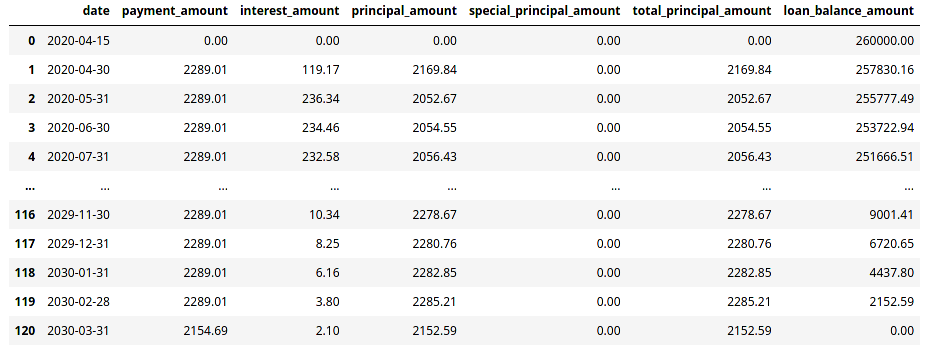
Specify payment amount
The example above calculated the payment amount that fully amortized the loan amount over its term. It is possible to specify a payment amount. Depending on the payment amount, the loan may be fully amortized over the loan term of not. To specify the payment amount use Loan argument payment_amount. Using the example above, add payment amount of 888.33 EUR per month:
loan = Loan(loan_amount=160000,interest_rate=1.1,loan_term=10,start_date='2020-06-15',payment_amount=888.33)
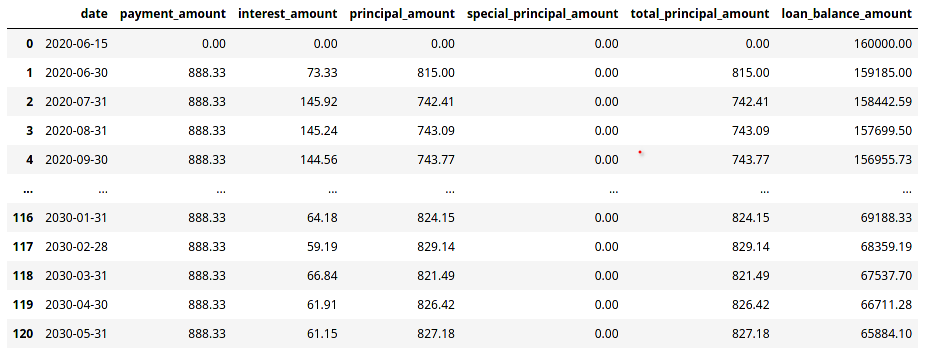
Specify payment frequency
The example above defines a loan with monthly repayment basis. It is possible to change this to quarterly, semi-annual or annual payments by setting value of the Loan argument annual_payments to 4, 2 or 1, respectively. Default argument value is 12 (monthly payments).
In addition, the payment schedule above assumes that payments are made at month end, with the first payment starting on the 30th of June 2020. In case repayments are not made at month end, this can be adjusted by setting the Loan argument payment_end_of_month to False and setting the argument first_payment_date to the date of the first payment date.
Below is an example of the same loan that is paid on quarterly basis, on the 15th of every month:
loan = Loan(loan_amount=160000,interest_rate=1.1,loan_term=10,start_date='2020-06-15',payment_amount=888.33,annual_payments=4)
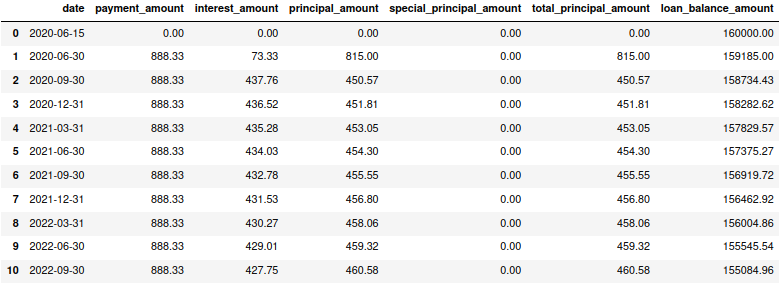
Specify payment date
In the examples above, payments were made on month end. It is possible to change this to a particular day of the month by setting of the Loan argument first_payment_date to a particular date. This will make the first and all subsequent payments fall on the specified day of the first_payment_date argument.
Following the example above, make first payment fall on the 17th of September. Each subsequent payment will fall on the 17th day of the month on which the payment is due.
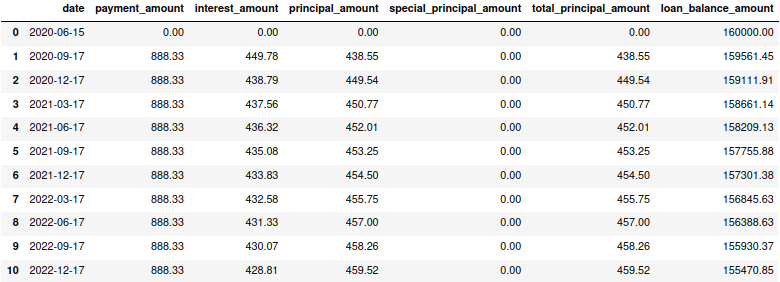
Note
When attribute first_payment_date is set, then attribute payment_end_of_month will be ignored.
Add special payments
To add special payments to the loan, use the add_special_payment method. This method has the following arguments:
payment_amount: the amount of the special payment.first_payment_date: the date of the first special payment in YYYY-MM-DD format.special_payment_term: the term of the special payment in years or months.annual_payments: the number of special payments per year.special_payment_term_period: the period of the special payment term, ‘Y’ for years or ‘M’ for months. Default value is ‘Y’.
For instance, following the example above, add special payment of 5000 EUR first paid on 2021-03-15 for next 8 years paid annually:
loan.add_special_payment(
  payment_amount=5000,
  first_payment_date='2021-03-17',
  special_payment_term=8,
  annual_payments=1,
  special_payment_term_period='Y'
  )
Next, recalculate payment schedule considering special payments as defined above:
payment_schedule = loan.get_payment_schedule()
This updates payment schedule by considering special payments
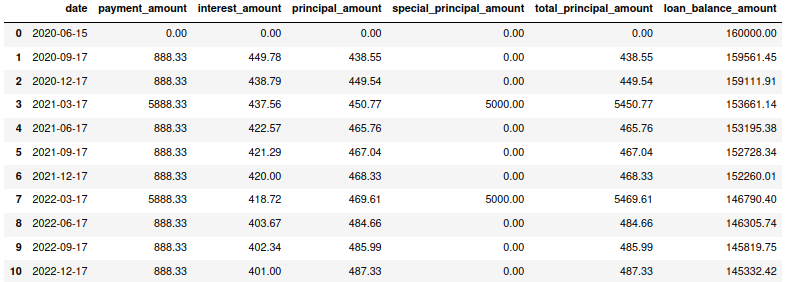
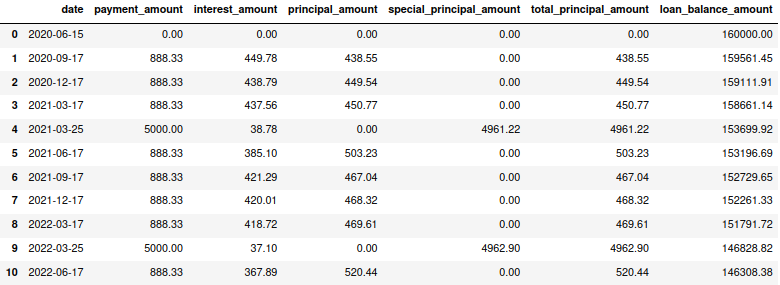
In the example above, special payments coincided with the payment date of a regular payment. It is possible to make special payments fall on dates other than the regular payment dates.
Interest-only period
In the examples above, principal and interest payments were made starting with the first payment due. It is possible to specify interest-only period by setting of the Loan argument interest_only_period to value greater than 0 (default value).
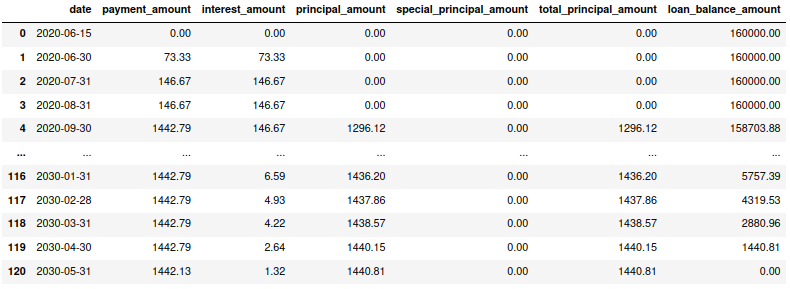
Using the initial example presented in this documentation, defines a 10-year mortgage/loan of 160,000 EUR with annual interest of 1.1% starting on the 15th of June 2020. By default, monthly payment amount will be calculated to amortize the loan amount fully over the given loan term. Also, by default, monthly payments fall on the last day of the month. However, let’s say interest-only period is 3-months; that is the Loan argument interest_only_period=3:
loan = Loan(loan_amount=160000,interest_rate=1.1,loan_term=10,start_date='2020-06-15',interest_only_period=3)
The loan defined above resembles the original example presented in this documentation. The only difference is that for the first 3 payments, payment includes interest-only (no principal amount).
The same loan can be defined with the loan term in months:
loan = Loan(loan_amount=160000,interest_rate=1.1,loan_term=120,loan_term_period='M',start_date='2020-06-15',interest_only_period=3)
Note
Consider that the Loan argument interest_only_period defines the number of payments that are interest-only. In the example above, payments were on monthly basis (the Loan argument annual_payments=12 (default value)). If the Loan argument annual_payments is set to 6, 4 or 1 (semi-annual, quarterly or annual), then the the Loan argument interest_only_period=3 would result in interest-only payments of 3 semi-annual or 3 quarterly, or 3 annual payments (depending on the Loan argument value of annual_payments).
Get loan summary
To get loan summary, use the get_loan_summary method:
payment_schedule = loan.get_loan_summary()
The above outputs a dataclass with the following fields:
loan_amount: original loan amount.total_payment_amount: total amount paid (principal and interest) over the loan term.total_principal_amount: total principal amount repaid.total_interest_amount: total interest amount repaid.residual_loan_balance: residual loan amount balance (which is calculated asloan_amountlesstotal_principal_amount).repayment_to_principal: ratio of total repaid amount to total repaid principal amount (which is calculated astotal_payment_amounttototal_principal_amount).
Tip
To define loan summary as pandas DataFrame, covert the LoanSummary object to a dictionary:
loan_summary = loan.get_loan_summary()
loan_summary_df=pd.DataFrame([loan_summary.__dict__])
This will generate a familiar DataFrame.

Interest rate compounding
By default PyLoan is compounding interest rates based on the 30/360 day count method, specifically the so-called 30E/360 ISDA method. To change the method use the compounding_method attribute when defining a loan, which accepts the following day count conventions:
30E/360 ISDA (a.k.a. 30/360 German): every single month is assumed to have 30 days, including February, A year is considered to have 360 days.
30E/360: every single month, except February, is assumed to have 30 days. February is not adjusted and is counted with its actual nubmer of days (28 or 29). A year is considered to have 360 days.
A/360: every single month is counted with its actual number of days. A year is considered to be 360 days.
A/365: every single month is counted with its actual number of days. A year is considered to be 365 days.
A/A: every single month is counted with its actual number of days. A year is counted with its actual number of days.
Tip
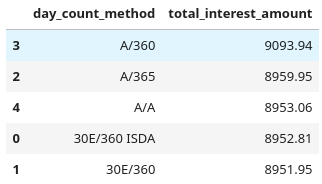
Certain day count conventions are more advantageous to the borrower while other day count conventions are more advantageous to the lender. Use the method get_loan_summary to compare which day count method is the least expensive and which is the most expensive in terms of total interest amount paid over the lifetime of a mortgage/loan.
Following the examples above, the code block below compares total interest amount paid on a 10-year mortgage/loan of 160,000 EUR with annual interest of 1.1% starting on the 15th of June 2020:
day_count_conventions=['30E/360 ISDA','30E/360','A/365','A/360','A/A']
loan_summary=list(map(lambda x:[x,Loan(loan_amount=160000,interest_rate=1.1,loan_term=10,start_date='2020-06-15',compounding_method=x).get_loan_summary().total_interest_amount],day_count_conventions))
Results can be summarized in the familiar pandas DataFrame:
loan_summary_df=pd.DataFrame(loan_summary,columns=['day_count_method','total_interest_amount'])
loan_summary_df.sort_values(by=['total_interest_amount'],ascending=False)
Loan/mortgage type
Use the Loan argument loan_type to change the type of the loan/mortgage:
‘annuity’ (default): gross monthly costs - principal plus interest - remain fixed during the term of the loan/mortgage.
‘linear’: net costs - principal - remains fixed during the term of the loan/mortgage. In turn, monthly costs fall during the lifetime of the mortgage.
‘interest-only’: only interest is paid on the balance of the loan/mortgage.